




















Popularmodapk.com backspace Popularmodapk.com backspace
Popularmodapk.com backspace
Location: 
Home > 
Tools
 > 
TimeLimit.io
TimeLimit.io6.0.1_Popularmodapk.com

TimeLimit.io apk app v6.0.1 for android

6.0.1 for Android
Popularmodapk.com score
9.2
TimeLimit.io screenshot image 1_Popularmodapk.com
TimeLimit.io screenshot image 2_Popularmodapk.com
TimeLimit.io screenshot image 3_Popularmodapk.com
TimeLimit.io screenshot image 4_Popularmodapk.com
TimeLimit.io screenshot image 5_Popularmodapk.com
TimeLimit.io screenshot image 6_Popularmodapk.com
TimeLimit.io screenshot image 7_Popularmodapk.com
TimeLimit.io screenshot image 8_Popularmodapk.com
TimeLimit.io screenshot image 9_Popularmodapk.com
TimeLimit.io screenshot image 10_Popularmodapk.com
TimeLimit.io screenshot image 11_Popularmodapk.com
TimeLimit.io screenshot image 12_Popularmodapk.com
TimeLimit.io screenshot image 13_Popularmodapk.com
TimeLimit.io screenshot image 14_Popularmodapk.com
TimeLimit.io screenshot image 15_Popularmodapk.com
TimeLimit.io screenshot image 16_Popularmodapk.com
TimeLimit.io screenshot image 17_Popularmodapk.com
TimeLimit.io screenshot image 18_Popularmodapk.com
TimeLimit.io screenshot image 19_Popularmodapk.com
TimeLimit.io screenshot image 20_Popularmodapk.com
TimeLimit.io screenshot image 21_Popularmodapk.com
TimeLimit.io screenshot image 22_Popularmodapk.com
TimeLimit.io screenshot image 23_Popularmodapk.com
TimeLimit.io screenshot image 24_Popularmodapk.com
TimeLimit.io screenshot image 25_Popularmodapk.com
TimeLimit.io screenshot image 26_Popularmodapk.com

The description of TimeLimit.io

Flexible

Apps are grouped to categories (a category can contain one or multiple App).

You can chose per category at which times it should be allowed. This allows preventing playing games too late.

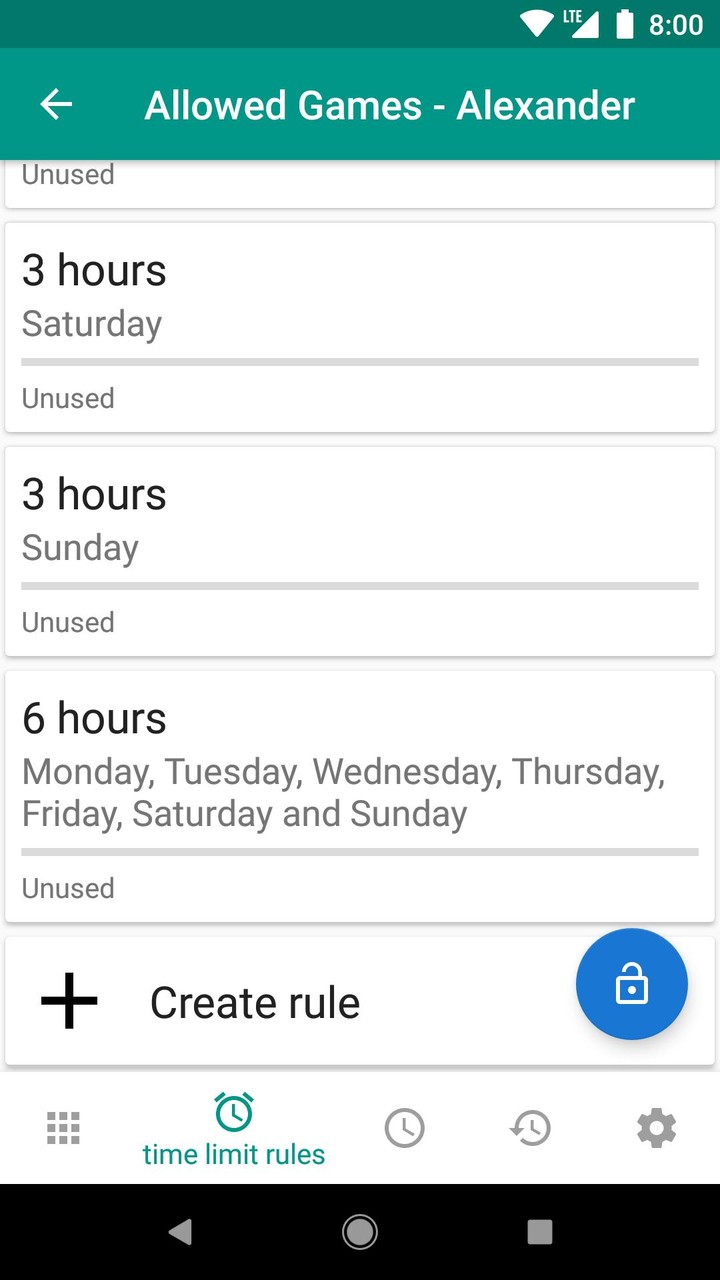
Additionally, you can configure time limit rules. These rules limit the total usage duration at one day or over multiple days (e.g. a weekend). It is possible to combine both, e.g. 2 hours per week end day, but in total only 3 hours.

Moreover, there is the possibility to set an extra time. This allows using something longer than regulary once. This can be used as bonus. There is additionally the option to disable all time limits temporarily (e.g. for the whole day or an hour).

Multi user support

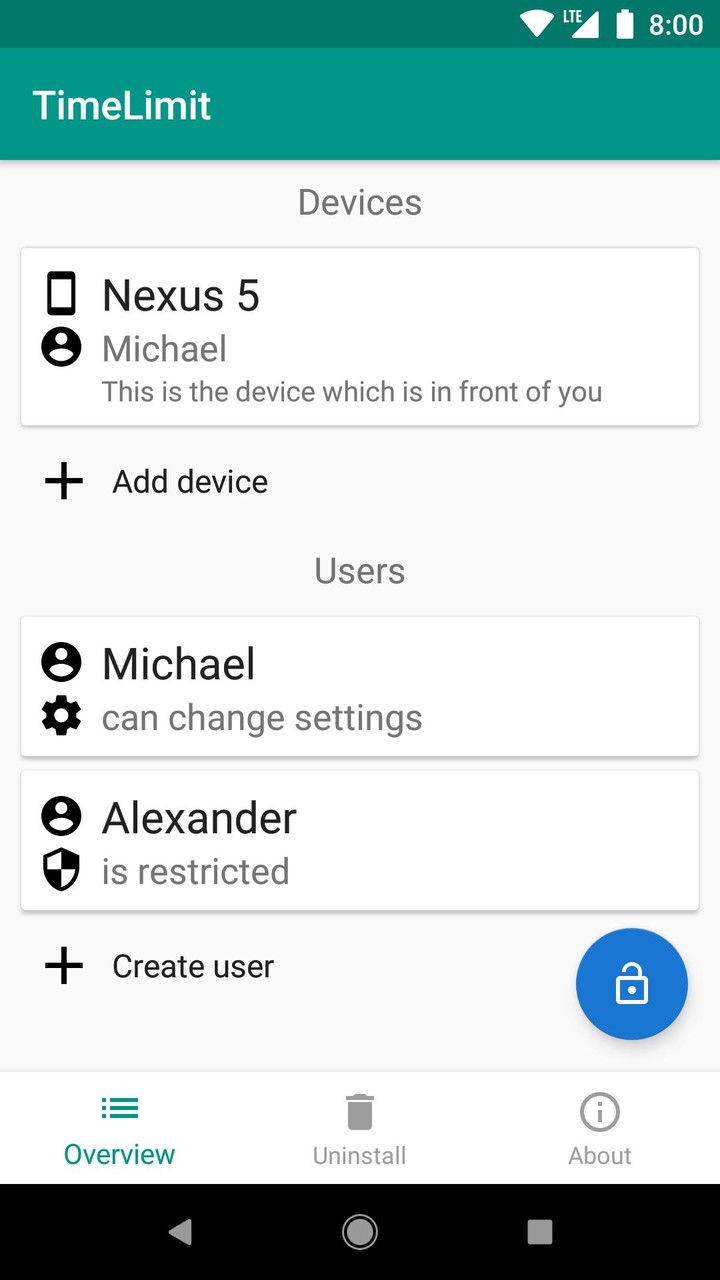
There is the scenario that one device is used by exactly one user. However, with tablets, there are often multiple possible users. Due to that, it is possible to create multiple user profiles in TimeLimit. Each user has got different settings and time counters. There are two kinds of users: parents and children. If a parent was chosen as user, then there are no restrictions. Parents can chose any other user as current user. Children can only chose themselves as current user.

Multi device support

There are scenarios in which one user has got multiple devices. Instead of time limits per device and splitting the limits across the devices, it is possible to assign one user to multiple devices.
Then the usage durations are counted together and allowing an App automatically affects all devices. Depending on the settings, only one device per time can be used or multiple devices at the same time. However, un the second case, it is possible to use more time than available e.g. at connection interruptions.

Connected

It is possible to view and change settings from any linked device. This connection is possible - if wanted - using your server.

Notes

Some features cost money if you don't use your own server. These features cost 1 € per month/ 10 € per year (in Germany).

TimeLimit does not work good at some smartphone brands (mostly Huawei and Wiko). With the correct settings, it can work better. But better is not good.

If it "does not work": This can be caused by power saving features. You can find at https://dontkillmyapp.com/ how you can disable these features. Get in touch with the support if that does not help.

TimeLimit uses the permission for the usage stats access. This is only used to detect the currently used App. Based on the currently used App, the App is blocked, allowed, or the remaining time is calculated.

The device admin permission is used to detect an uninstallation of TimeLimit.

TimeLimit uses the notification access to block notifications of blocked apps and to count and block background playback. Notifications and their contents are not saved.

TimeLimit uses an accessibility service to press the home button before showing the lock screen. This fixes blocking in some cases. Moreover, this allows opening the lockscreen at newer Android versions.

TimeLimit uses the permission "draw over other Apps" to allow opening the lockscreen at newer android versions and to overlay blocked Apps until the lockscreen is launched.

TimeLimit uses the location access to detect the used WiFi network and allow/ block Apps depending on it and your settings. The location access is not used otherwise.

More

TimeLimit.io 6.0.1 Update

- fixed issues related to disabling device admins
- extended whitelist

More

Additional Information

Category:  Tools
Publisher:  JoLo Software
Requirements:  Andriod 5.0+
Publish Date:  08/05/2022
Similar to TimeLimit.io
Galaxy VPN - VPN Unlimited2.1.2_Popularmodapk.com

Galaxy VPN - VPN Unlimited

GalaxyVPN is a free and unlimited VPN (Virtual Private Network) proxy for Android devices. GalaxyVPN masks your IP address, encrypt your internet traffic, turns public Wi-Fi into a private network and helps unblock sites and apps on your Android phone so that you can access any restricted content safely and anonymously.
VPN (Virtual Private Network) works just like Tor proxy, also known as “the Onion Router”, to hide IP address and bypass internet censorship, to overcome geo-restriction and access the desired content. VPN (Virtual Private Network), however, has a much faster connection speed, and better privacy and security protection than Tor (the Onion Router).
Three main features of a VPN (Virtual Private Network):
• Incognito Browsing: using a VPN you don’t even have to install any incognito browser. Simply turn on your VPN and all of your Internet traffic is completely encrypted. Your online activities are completely anonymous.
• Wifi Safety: because all your online traffic is encrypted through a VPN, whatever public WiFi hotspot you are trying to access, you will be shielded from public Wifi risks and enjoy complete Wifi security.
• Location Spoofer: VPN hides your IP address so that your location is masked and you are able to bypass geo-restrictions to access any content anywhere.
 
Install GalaxyVPN Now to:
► Unblock Websites and Apps  
You can unblock any apps or websites using GalaxyVPN free & unlimited VPN. Bypass government censorship and geo-restrictions to access blocked websites from anywhere!
► Anonymous Connection and Privacy Protection
Using a VPN, your IP and location will be masked and your activities can no longer be tracked on the Internet. GalaxyVPN service is your privacy guard and better than web proxy servers.
► Secure Your Device
GalaxyVPN secures your Android device’s connection while you’re connected to public WiFi hotspots or cellular data networks. It works just like a free Tor proxy (the Onion Router) but it’s even more secured. Your password and your personal data are secured and you are protected from hacker attacks.
► Surf anonymously at Fast Speed
GalaxyVPN is fast! It detects your location automatically and connects you to the nearest and fastest server. As a result, your connection will be much faster than any other VPN or proxy providers.
GalaxyVPN free version shows ads. Upgrade to premium to enjoy unlimited and ad-free VPN!
Buisiness Partner
Common tool tutorial: https://bit.ly/319x6nr
8.0
v2.1.2 · 34.2MB
25/05/2022
close Popularmodapk.com
top_Popularmodapk.com
Popularmodapk.com home
Home
Popularmodapk.com games
Games
Popularmodapk.com apps
Apps
Popularmodapk.com ranking
Ranking