Popularmodapk.com backspace Popularmodapk.com backspace
Popularmodapk.com backspace
Location: 
Home > 
Tools
 > 
Rotation Control
Rotation Control4.0.1_Popularmodapk.com

Rotation Control apk app v4.0.1 for android

4.0.1 for Android
Popularmodapk.com score
9.8
Rotation Control screenshot image 1_Popularmodapk.com
Rotation Control screenshot image 2_Popularmodapk.com
Rotation Control screenshot image 3_Popularmodapk.com
Rotation Control screenshot image 4_Popularmodapk.com
Rotation Control screenshot image 5_Popularmodapk.com
Rotation Control screenshot image 6_Popularmodapk.com
Rotation Control screenshot image 7_Popularmodapk.com
Rotation Control screenshot image 8_Popularmodapk.com
Rotation Control screenshot image 9_Popularmodapk.com
Rotation Control screenshot image 10_Popularmodapk.com
Rotation Control screenshot image 11_Popularmodapk.com

The description of Rotation Control

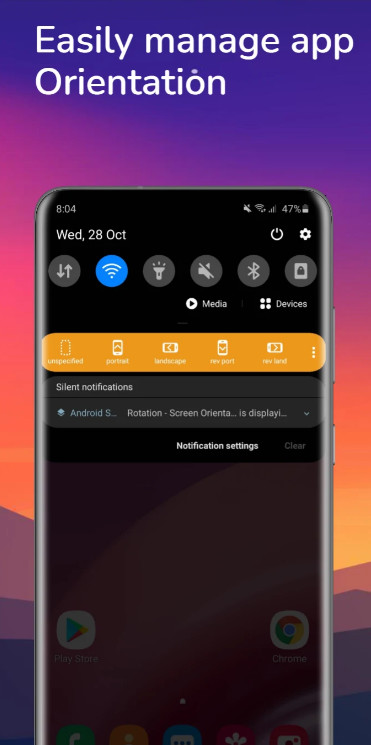
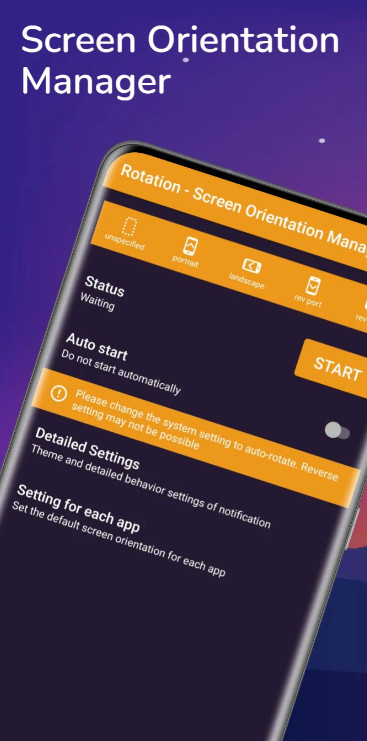
Rotation - Screen Orientation Manager application use to set mobile screen in a specific orientation (portrait / landscape) or rotates mobile screen according to the sensor.


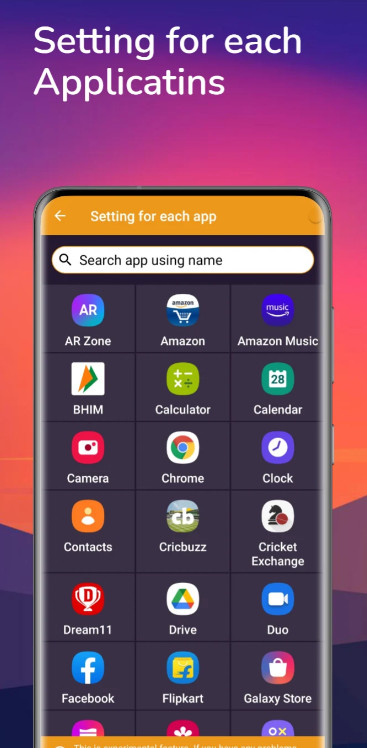
You can change the mobile screen orientation from the notification area. Rotation - Screen Orientation Manager is also possible to associate a specific application with the screen orientation and change settings when the application starts.

In Rotation - Screen Orientation Manager not all settings are available because some mobile screen orientations are not supported by some devices.

Because Rotation - Screen Orientation Manager app forcibly changes the display of the running application, it can become inoperable or, in the worst case, cause a crash.
Please use at your own risk.

The following settings are possible
unspecified
- Unspecified orientation from this app. Device will be the original orientation of the displayed app
force sensor
- Rotate based on sensor information
portrait
- Set device screen to portrait
landscape
- Set device screen to landscape
rev port
- Set device screen to reverse portrait
rev land
- Set device screen to reverse landscape
sensor port
- Set device screen to portrait, automatically flip upside down by sensor
sensor land
- Set device screen to landscape, automatically flip upside down by sensor
lie left
- Rotate it 90 degrees to the left with respect to the sensor. If you lie on left lateral and use it, the top and bottom will match.
lie right
- Rotate it 90 degrees to the right with respect to the sensor. If you lie on right lateral and use it, the top and bottom will match.
headstand
- Rotate 180 degrees with respect to the sensor. If you use this by headstand, the top and bottom will match.

Trouble shooting
- If you can not fix in the opposite direction of the portrait / landscape, try changing the system setting to auto-rotate
More

Additional Information

Category:  Tools
Publisher:  Neptune Tools And Media
Requirements:  Android 5.0+
Publish Date:  20/09/2022
Get It On:  google play Popularmodapk.com
Similar to Rotation Control
Galaxy VPN - VPN Unlimited2.1.2_Popularmodapk.com

Galaxy VPN - VPN Unlimited

GalaxyVPN is a free and unlimited VPN (Virtual Private Network) proxy for Android devices. GalaxyVPN masks your IP address, encrypt your internet traffic, turns public Wi-Fi into a private network and helps unblock sites and apps on your Android phone so that you can access any restricted content safely and anonymously.
VPN (Virtual Private Network) works just like Tor proxy, also known as “the Onion Router”, to hide IP address and bypass internet censorship, to overcome geo-restriction and access the desired content. VPN (Virtual Private Network), however, has a much faster connection speed, and better privacy and security protection than Tor (the Onion Router).
Three main features of a VPN (Virtual Private Network):
• Incognito Browsing: using a VPN you don’t even have to install any incognito browser. Simply turn on your VPN and all of your Internet traffic is completely encrypted. Your online activities are completely anonymous.
• Wifi Safety: because all your online traffic is encrypted through a VPN, whatever public WiFi hotspot you are trying to access, you will be shielded from public Wifi risks and enjoy complete Wifi security.
• Location Spoofer: VPN hides your IP address so that your location is masked and you are able to bypass geo-restrictions to access any content anywhere.
 
Install GalaxyVPN Now to:
► Unblock Websites and Apps  
You can unblock any apps or websites using GalaxyVPN free & unlimited VPN. Bypass government censorship and geo-restrictions to access blocked websites from anywhere!
► Anonymous Connection and Privacy Protection
Using a VPN, your IP and location will be masked and your activities can no longer be tracked on the Internet. GalaxyVPN service is your privacy guard and better than web proxy servers.
► Secure Your Device
GalaxyVPN secures your Android device’s connection while you’re connected to public WiFi hotspots or cellular data networks. It works just like a free Tor proxy (the Onion Router) but it’s even more secured. Your password and your personal data are secured and you are protected from hacker attacks.
► Surf anonymously at Fast Speed
GalaxyVPN is fast! It detects your location automatically and connects you to the nearest and fastest server. As a result, your connection will be much faster than any other VPN or proxy providers.
GalaxyVPN free version shows ads. Upgrade to premium to enjoy unlimited and ad-free VPN!
Buisiness Partner
Common tool tutorial: https://bit.ly/319x6nr
8.0
v2.1.2 · 34.2MB
25/05/2022
close Popularmodapk.com
top_Popularmodapk.com
Popularmodapk.com home
Home
Popularmodapk.com games
Games
Popularmodapk.com apps
Apps
Popularmodapk.com ranking
Ranking